AI Agent Reliability: Why Large Prompts Silently Failed in a Production AI Agent Gateway
In production, AI agents fail in ordinary ways. A process does not start, a tool times out, an input is bigger than something downstream expects. The dangerous failures are the silent ones: the user gets a vague message, and nobody on the team sees an error.
This post explains what AI agent reliability means and where agents usually break, then walks through a real bug from our code audit of Agent37's AI agent gateway. On one harness, any prompt bigger than about 128 KiB never ran, and the customer saw only "Grok ended the turn before it completed". Agent37 shipped the fix as release 0.16.1 with a regression test and credited the report in the commit. After the case, we cover how to test and monitor an agent so this kind of bug shows up before customers find it.
What is AI agent reliability?
An AI agent is reliable when every turn either completes or fails with an error someone can act on. That is a different question from model quality. A model can give great answers, and the agent around it can still drop requests because a tool call, a subprocess or an API limit failed.
Agents are harder to keep reliable than a typical web app because one turn passes through many steps: the API that accepts the request, the model call, tool calls, subprocesses, external APIs and storage. Each step has its own limits and its own way of failing. The more steps a turn has, the more places it can break, and the harder it gets to see where.
LLM reliability work usually focuses on the model: evaluations, hallucinations, output formats. For an LLM in production, the plumbing around the model fails too, and it usually gets less attention.
Why AI agents fail in production
AI agent reliability problems usually come from a short list:
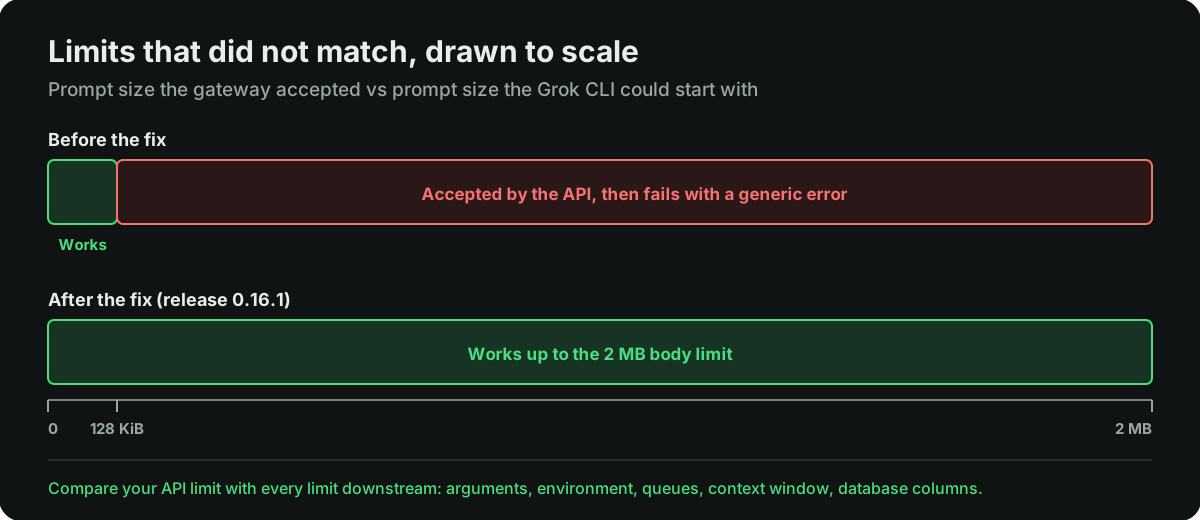
- Limits that do not match. The API accepts one size, and something downstream accepts less: a command-line argument, an environment variable, a message queue, a context window, a database column.
- CLI and subprocess integrations. Exit codes, start failures and stderr get ignored, so a failed process looks like a process that had nothing to say.
- Timeouts and rate limits on model and tool APIs, with no retry or a retry that never ends.
- Errors swallowed into a generic message. The user sees "something went wrong", and the logs show nothing more.
- Fixes applied to one integration and not to its siblings, so the same hazard stays in the next adapter over.
The case below hits four of these five.
A real case: large prompts failed silently in an AI agent gateway
Agent37's gateway is an open-source, MIT-licensed AI agent gateway: an HTTP API that sends turns to an agent on an instance and streams the results back. One request field, agent, picks the harness: Hermes, OpenClaw, Claude Code, Codex, OpenCode, Grok or Pi. Client code stays the same whatever runs behind it. The gateway runs each agent's CLI on the same machine.
The bug
We reviewed commit dbe5f81. The path:
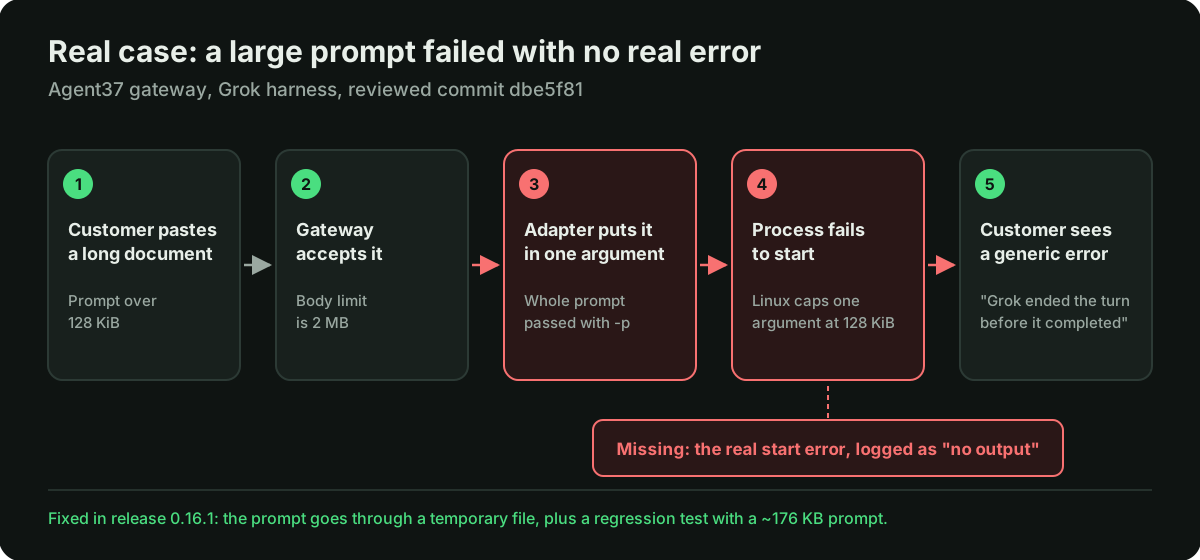
- The gateway accepts request bodies up to 2 MB, set in
server/app.ts. - The Grok adapter passed the whole prompt to the Grok CLI as a single command-line argument (
-p). - Linux caps a single command-line argument at 128 KiB. Anything bigger makes the process fail to start.
- The adapter treated that start failure as "no output". There was nothing on stdout or stderr and nothing the error map could classify, so the turn ended with the generic message.
So any prompt between 128 KiB and 2 MB was accepted by the API and then failed without a reason. A real customer reaches that range by pasting one large document.
Why it was easy to miss
Short prompts work, so ordinary testing passes. The bug shows up only with real customer inputs, and when it does, the error says nothing useful. That is how a reliability bug turns into support tickets nobody can explain.
The lesson was already in the codebase
The Pi adapter in the same repo, server/adapters/pi-adapter.ts, sends its prompt through stdin. Its comment says why: as a command-line argument, the prompt would be size-bound.
The hazard was documented and avoided in one adapter and not carried over to its neighbour in server/adapters/grok-adapter.ts. What we had to notice was that one adapter knew something the other did not.
The fix
Agent37 fixed it in release 0.16.1 (PR #38). The Grok adapter now writes the prompt to a temporary file that only its owner can read, passes the file path to the CLI with --prompt-file, and deletes the file when the turn ends.
Agent37's team checked the limit on a production host: a 127 KiB prompt worked, and a 128 KiB prompt failed. They added a regression test that sends a prompt of about 176 KB end to end, and credited the report in the commit message. Thanks to Agent37's team for the fix and the test.
What we did not prove
- We did not run anything. This was a static review. The 127 KiB and 128 KiB check on a real host was done by Agent37's team, not by us.
- We did not measure how often customers hit this in practice.
- We did not know whether the Grok CLI could read a prompt from stdin. That affected the choice of fix, not the bug. Agent37 chose a file.
The pattern
In a codebase with several adapters behind one interface, each adapter tends to learn its own lessons. When one of them works around a hazard, the others often still have it.
We saw the same shape in our security review of Rome. There, Rome's email channel already blocked spoofed senders from reaching the trusted path, and the inbox lookup went around it. Across three reviews, the most useful findings sat in places where the code already knew better somewhere else.
AI agent testing: catch reliability bugs before users do
Agent tests often use short, friendly inputs, which is exactly why this bug survived. A few changes to how you test catch most of this class:
- Test with real-sized inputs. For every limit in the path, send one input just under it and one just over it. The over-limit case should fail with a clear error, not silently.
- Run the same test against every integration. If your agent supports several models, harnesses or tools, a test that passes on one tells you nothing about the others. Here, the Pi adapter would have passed and the Grok adapter would have failed.
- Inject failures on purpose. Make a CLI fail to start, make an API time out, return an empty response, and check what the user and the logs see.
- Keep the regression test after the fix. Agent37 added an end-to-end test with a prompt of about 176 KB, so the same bug cannot come back quietly.
AI agent monitoring: what to watch in production
Testing catches what you thought of. AI agent monitoring catches the rest. For an agent in production, these signals matter most:
- The outcome of every turn, with a reason. Completed, failed with a known error, or failed with an unclassified error. A rising share of unclassified failures is the earliest sign of a bug like this one.
- Process start errors and exit codes. Log the real error, such as
spawn E2BIGor a missing binary, together with exit codes and stderr, instead of collapsing them into "no output". - Failure rate per model, harness and tool. A spike on one harness while the others are healthy points to that adapter, not to the model.
- Input size against your limits. If you see requests close to a known cap, you know which customers are about to hit it.
- Latency, token use and cost per turn, so a slow or expensive regression shows up in a chart before it shows up in an invoice.
With these signals in place, this bug would have looked obvious: failures on the Grok harness only, all with large inputs, all ending in "no output".
AI agent reliability checklist
- Compare your API's body limit with every limit downstream of it. Command-line arguments, environment variables, message sizes and database columns all have their own caps.
- Do not put user input in a command-line argument when it can grow. Use stdin or a file instead.
- Never turn a process start failure into "no output". Surface the real error so support can see what happened.
- When you fix a hazard in one adapter or integration, check its siblings in the same change. The next adapter over usually has the same problem.
- Test with real-sized inputs: a long document, a big log, a full transcript.
- Track the share of turns that fail without a known reason, per harness and per tool.
How we work
In a code audit, a finding does not have to be a vulnerability. A bug that customers hit and support cannot explain is worth reporting too, and we say which kind each finding is.
FAQ
What is AI agent reliability?
It is how consistently an agent completes its turns or fails with an error someone can act on. It depends on the model and on the plumbing around it: request limits, tool calls, subprocesses, external APIs and error handling.
How do you test an AI agent for reliability?
Reliability testing for AI agents should use real-sized inputs, one just under and one just over every limit in the path, and run the same tests against every model, harness or tool you support. Inject failures on purpose, such as a process that does not start or an API that times out, and keep a regression test for every bug you fix.
What should you monitor in an AI agent in production?
AI agent monitoring should track the outcome of every turn with a reason, process start errors and exit codes, failure rates per model and per tool, input sizes against known limits, and latency, tokens and cost per turn. The most useful single number is the share of turns that fail without a known reason.
What does "spawn E2BIG" or "Argument list too long" mean?
The operating system refused to start a process because its command-line arguments, or one of them, were too large. In Node.js it shows up as spawn E2BIG, in a shell as "Argument list too long". In this gateway the error was swallowed, so the user saw only a generic message.
What is the maximum length of a command-line argument on Linux?
A single argument is capped at 128 KiB. The total size of all arguments plus environment variables has a separate, larger limit. Agent37's team confirmed the single-argument cap on a production host: 127 KiB worked, 128 KiB failed.
How do you pass a large prompt to a CLI from Node.js or Python?
Send it through stdin or write it to a temporary file and pass the file path. That is what the gateway does now: the prompt goes to a file readable only by its owner, the CLI reads it with --prompt-file, and the file is deleted when the turn ends. Do not put user input in a command-line argument when it can grow.
Does a code audit only look for security vulnerabilities?
No. A code audit also finds bugs that break the product for real users, like this one. We say which kind each finding is: this was a reliability and production readiness bug, with no data exposed and no access gained.
We do code audits and production readiness reviews of AI agent products by hand, for reliability as well as security. Tell us about your product.