AI Sandbox Escape: How a Scanned Repo Could Make an AI Security Scanner Read Files Outside Its Sandbox
An AI agent sandbox limits what the agent's tools can touch: which folder it can read, which commands it can run, where it can connect. It only works if every route to a file goes through it. One route around it, and the sandbox is a promise in the docs.
This post explains what an AI agent sandbox is, what an AI sandbox escape looks like and how agents escape the sandbox, then walks through a real case from our code review of agentgg, an open-source AI security scanner. Its security policy says the agent's file tools are scoped to the scanned repository and that any way out of that root is a vulnerability. We found that the CLI itself read a file path that came from model output, outside the root, and put the whole file into the next LLM prompt. agentgg fixed it in version 0.1.29 and published the advisory with credit.
What is an AI agent sandbox?
An AI agent sandbox is the set of limits that holds no matter what the model decides to do. For a code-scanning agent, that usually means file tools like Read, Glob and Grep that can only see the repository being scanned. For a general agent, it can also mean a container, a separate user account, no network access or a short list of allowed commands.
The sandbox exists because the model is not trusted. A scanning agent reads code written by someone else, and text in that code can steer the model. That is prompt injection, and there is no reliable fix for it at the model level. The sandbox is the layer that decides what a steered model can still reach.
There are two common ways to build one:
- Tool-level limits. Each tool checks its own arguments, for example that a requested path is inside the allowed folder.
- System-level limits. The whole agent runs somewhere it cannot do much damage: a container, a VM or a user account with no secrets.
Tool-level limits are cheaper and more common. They also have more ways to fail, because every piece of code that touches a file has to apply the same check.
What is an AI sandbox escape?
An AI sandbox escape is any way for an agent, or the code around it, to reach something the sandbox was supposed to keep out of reach: a file outside the allowed folder, a command that should not run, a network the agent should not touch. The model does not have to break anything clever to escape sandbox restrictions. Usually the escape is a route the sandbox never covered.
That matters because of how agents get steered. If the sandbox holds, a prompt injection leads to a bad answer. If there is an AI agent sandbox escape, the same injection can read secrets from the machine the agent runs on.
How AI agents escape the sandbox
An AI agent sandbox escape usually comes down to one of a few patterns:
- A path from model output is used directly by application code, outside the sandboxed tools, so the tool's checks never run.
- Path traversal: an absolute path like
/etc/passwdor a relative path with../resolves outside the allowed folder. - Symlinks: the check compares path strings, but the read follows a symlink to somewhere else.
- A prefix check without a separator: the root
/work/appalso matches/work/app-secrets. - A strict check exists, but it guards only some operations, for example writes and not reads.
The case below involves all five.
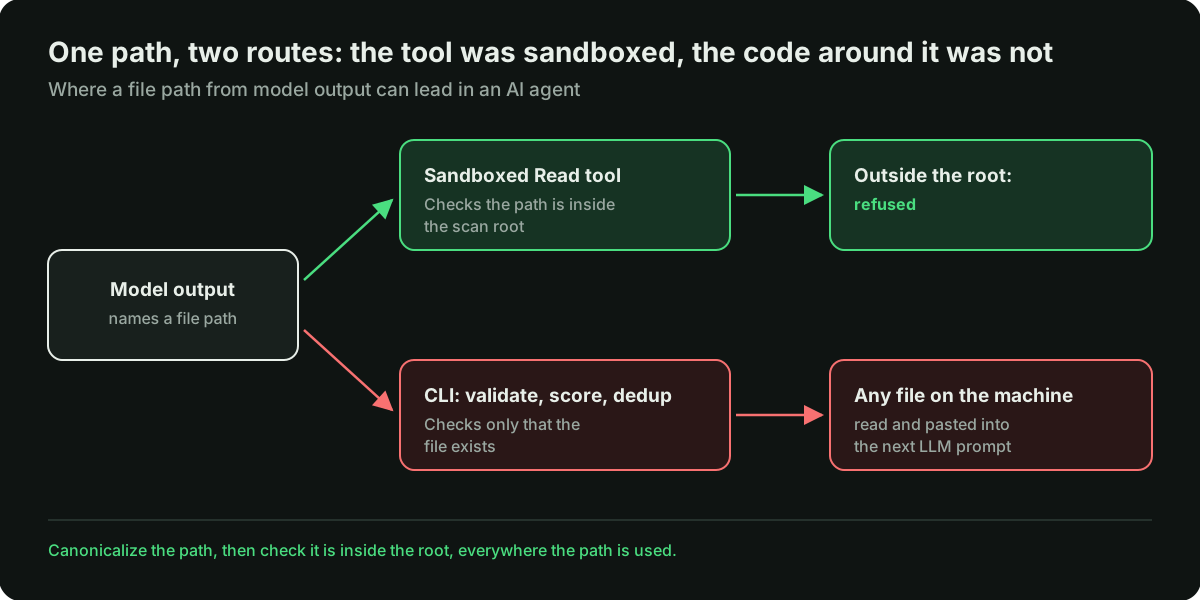
Path traversal and directory traversal, in short
Path traversal, also called directory traversal, is one of the oldest web vulnerabilities. An application takes a file path from outside, joins it to a base folder and reads the result. If nothing checks the final location, a path like ../../etc/passwd or an absolute path reads a file the application never meant to expose.
In classic web apps the path comes from a user or a URL. In AI agents it can also come from the model. If the model's output names a file, and the model can be steered by the content it reads, the person who wrote that content effectively chooses the path.
A real case: an AI security scanner reading outside its sandbox
agentgg is an open-source CLI that uses LLM agents to scan code for vulnerabilities, in the category often called AI SAST. It can scan a whole repository or a git diff for pull request review, and its README says the hosted version at app.agentgg.dev runs the same scanner.
That means the scanner regularly reads code that someone else wrote: a pull request scanned in CI, or a repository a user uploads. agentgg's SECURITY.md draws the boundary itself. The model gets Read, Glob and Grep tools scoped to the scanned root, and any way to break out and access files outside that root is a vulnerability.
The finding: an AI agent sandbox escape vulnerability (Moderate)
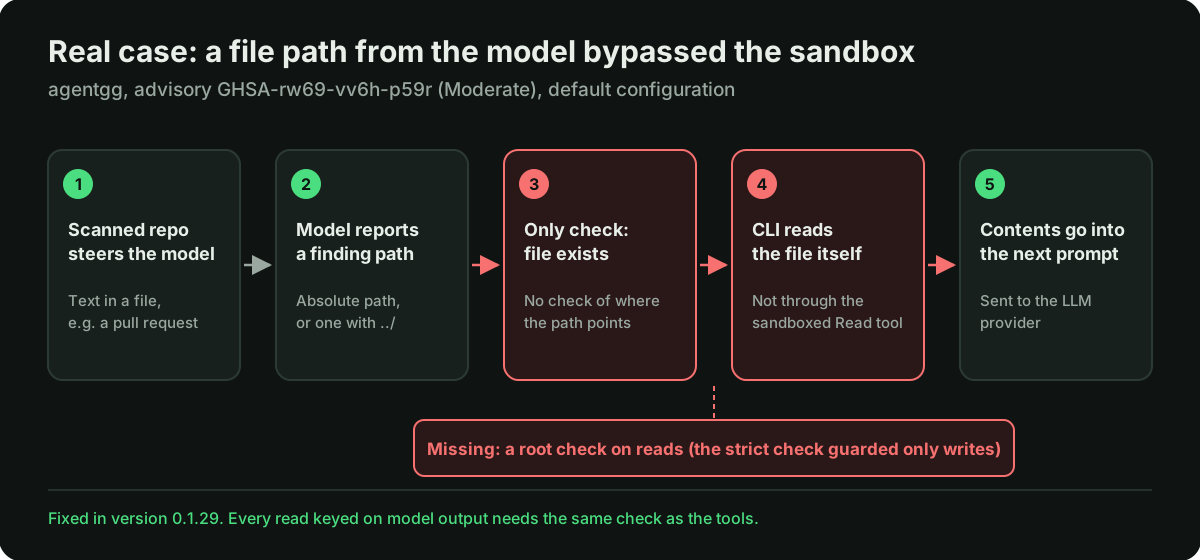
The advisory is GHSA-rw69-vv6h-p59r. We reviewed commit c1e6e33. The path:
- The detector model reports a finding with a
filePath. That value comes straight from model output, and it may be absolute or contain... - The model's path overrides the path the agent was seeded with. The schema description says the value is ignored when the caller already knows the path, but the code does the opposite.
- The only check on that path is that the file exists. An absolute path such as
/proc/self/environpasses unchanged, and../../xresolves outside the root. - Validation and scoring are on by default. In both, the CLI reads the file itself and pastes its full contents into the next LLM prompt.
Here is the core of it, simplified from the code we reviewed. The path from the model is passed to resolve(root, ...), and resolve does not keep a path inside root:
// Simplified from agentgg, commit c1e6e33 (packages/cli/src/commands/scan.ts)

// finding.filePath comes straight from model output.
// The only check is that the file exists:
if (existsSync(resolve(root, finding.filePath))) keep(finding);

// Later, validation and scoring read the file and send it to the LLM:
const content = readFileSync(resolve(root, finding.filePath), "utf8");

// resolve() returns absolute paths unchanged and follows "..":
resolve("/work/repo", "/proc/self/environ"); // "/proc/self/environ"
resolve("/work/repo", "../../x");            // "/x"
Because the CLI reads the file directly, the sandboxed Read tool is never involved. This works with every model provider, including the detector configuration that has no tools at all.
The file can be anything that exists on the scanning machine: the CI job's environment, cloud credentials, agentgg's local config. Its contents go to the configured LLM provider.
The stricter check already existed
agentgg has a function, assertSafeFilePath in packages/core/src/paths.ts, that refuses absolute paths and .. segments. The authors clearly treat those paths as unsafe. But the function guards only writes to the scanner's state folder. The reads that matter here go through existsSync and nothing else.
The advisory also notes two related gaps with the same root cause. Paths are never canonicalized, so a symlink committed to the scanned repo is followed on read. And the Read tool's own bound compares path strings by prefix, without a separator, so a sibling folder whose name starts with the root's name also passes.
agentgg fixed this in version 0.1.29 and published the advisory on November 3, 2026, with credit for the report. Versions up to 0.1.25 are affected.
What we did not prove
- We did not run anything. This was a static review of the code.
- The attack needs the model to report an attacker-chosen path, which depends on prompt injection working. That is probabilistic, and we did not measure how often it succeeds.
- The file's contents reach the LLM provider every time the path is used. We did not verify whether they also appear in reports or CI artifacts that an attacker could read.
The pattern
The strict check existed and guarded the wrong operation. We saw the same shape in our AI agent access control review, where the stronger control also existed in the codebase and was not on the path that mattered. In agent code it is an easy mistake to make: the tools get careful checks, and the application code around them handles the same inputs without one.
How to build an AI agent sandbox that holds
These rules apply whether you run an off-the-shelf agent or build your own AI agents:
- Treat every path in model output as untrusted input, the same as a path in a URL.
- Canonicalize before you check. Resolve the real path, including symlinks, and then check that it sits inside the root with a separator-aware comparison.
- Apply that check to every read keyed on model or repository input, in the tools and in the application code around them, for reads as well as writes.
- Do not let the model override a value your code already knows, such as the file an agent was asked to look at.
- Add a system-level layer as defense in depth: run the agent as a separate user, in a container, with no cloud credentials in its environment.
AI agent sandbox escape: containment after an incident
If you ran an affected version of a tool on code you did not write, treat it as a possible AI agent sandbox escape containment incident, even without evidence that the path was used:
- Upgrade the tool to a fixed version first, so the same runs do not repeat the exposure.
- Rotate every secret the agent's process could read: model provider keys, cloud credentials, CI tokens, anything in its environment or home folder.
- Check scan outputs and CI artifacts from those runs for file contents that do not belong to the scanned repository.
- Move the agent into an isolated job or container before you run it on untrusted code again.
Securing AI security scanners in CI
AI security scanners and AI code review tools are a special case, because their job is to read untrusted code. In CI they often run on pull requests from people outside the team, on machines that hold deployment keys or cloud credentials.
An agent sandbox escape inside a CI job reaches whatever that job can reach. If you run one, give the scanning job its own environment with only the model provider key it needs. Keep cloud credentials, deploy keys and other secrets out of that job entirely. Check what the tool writes to its output folder before you upload it as an artifact, because that is a second way for a secret to leave the machine. We covered that in a separate case: GitHub Actions secrets and an API key in scan results.
How we work
We read the project's security policy first, so we know what it promises to protect. We review the code statically and tie each finding to files and lines. We report through the project's private vulnerability reporting channel and write about a finding once the advisory is public. Thank you to the agentgg team for fixing it and publishing the advisory.
FAQ
What is an AI agent sandbox?
It is the set of limits that holds whatever the model decides: which files the agent's tools can read, which commands it can run, which networks it can reach. It can be enforced by the tools themselves, by the system the agent runs in, or both.
What is an AI sandbox escape?
Any way for an AI agent, or the code around it, to reach something outside its limits. In this case the agent's file tools were scoped correctly, but the application code around them read a file whose path came from the model, with no check on where it pointed.
What is path traversal, or directory traversal?
A vulnerability where a file path from outside the application, such as ../../etc/passwd or an absolute path, is used to read a file outside the folder the application meant to expose. In AI agents the path can come from model output, which content the agent reads can influence.
How do you prevent path traversal in an AI agent?
Resolve the real path first, including symlinks, then check that it is inside the allowed root with a separator-aware comparison. Apply the same check everywhere a path from the model or from scanned content is used, not only inside the agent's tools.
Is it safe to run an AI security scanner on untrusted pull requests?
It can be, if the scanner's sandbox holds and the job has nothing worth stealing. Run it with only the model provider key it needs, keep other secrets out of the job, and check its output folder before uploading it as an artifact.
Is this prompt injection?
Partly. Getting the model to report a chosen file path relies on prompt injection. The vulnerability itself is in the code: the CLI read that path without checking where it pointed.
We review AI agents, AI security tools and AI-generated codebases by hand, with every finding tied to specific files. Tell us about your product.