GitHub Actions Secrets: How a "Not Persisted" API Key Ended Up in a Downloadable Artifact
GitHub Actions hides your secrets in workflow logs. It does not look inside the files a job uploads as artifacts. If a tool writes a secret into its output folder and the workflow uploads that folder, the secret leaves the runner in plain text, and anyone with read access to the repository can download it.
This post explains how GitHub Actions secrets are protected and where that protection stops, then walks through a real case from our code review of agentgg, an open-source AI security scanner. Its --api-key flag was documented as "one-shot" and "not persisted", but the CLI wrote the key in plain text into its run metadata, inside the output folder that its own CI example uploads as an artifact. agentgg fixed it in version 0.1.26 and published the advisory with credit.
How GitHub Actions secrets are protected
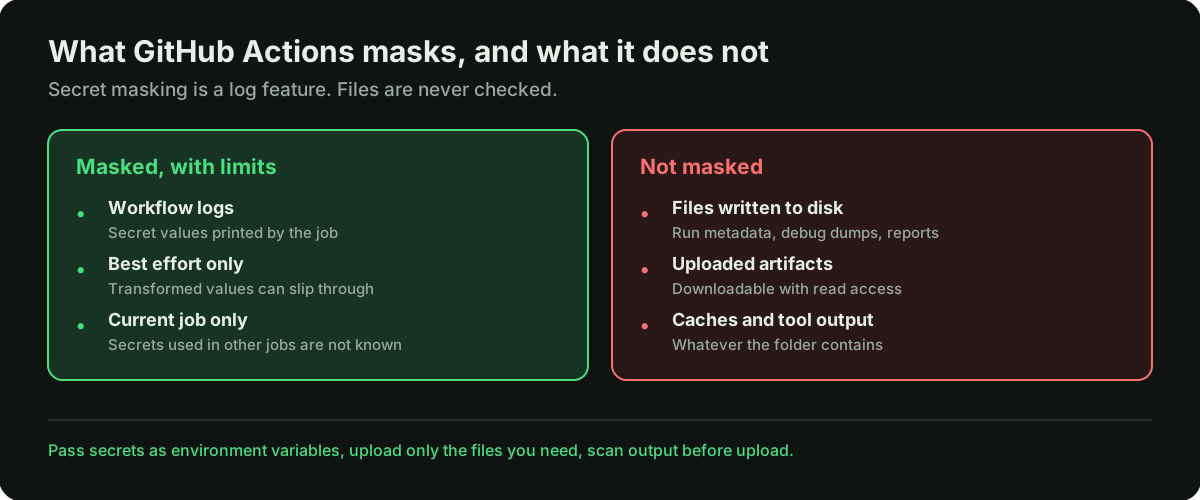
You store a secret in the repository or organization settings, and a workflow receives it as an input or an environment variable. While the job runs, GitHub redacts secret values that are printed to workflow logs.
That redaction has limits, and GitHub states them itself:
- It applies to logs. A file the job writes to disk is not touched.
- It is not guaranteed even in logs, because a secret can be transformed in ways the runner does not recognize.
- The runner can only redact secrets used in the current job.
GitHub Actions secrets in artifacts
Artifacts are files a job uploads so they survive after the run. People who are signed in to GitHub and have read access to the repository can download them. On a public repository, that is everyone with a GitHub account. By default, artifacts are kept for 90 days.
So a secret inside an artifact file is not masked, is downloadable and stays available for months.
Where API keys leak in CI
API key security in CI rarely fails because someone printed a key on purpose. Keys leak through places nobody thought of as output:
- Command-line arguments. A key passed as a flag becomes part of the command line, and tools often record their own command line for debugging or reproducibility.
- Files written by tools: run metadata, debug dumps, crash reports, cached config.
- Artifacts and caches that upload whole folders instead of the specific files a later step needs.
- Error messages that include the request a tool was making, headers and all.
The case below is the first two, delivered through the third.
A real case: an API key in plain text in scan results
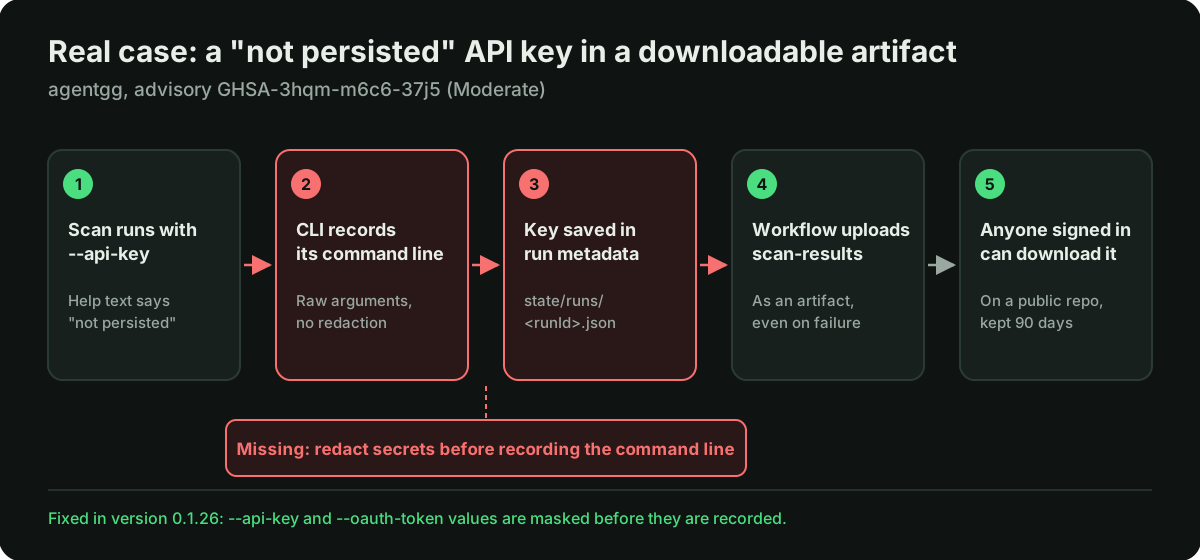
agentgg is an open-source CLI that uses LLM agents to scan code for vulnerabilities. It needs an API key for a model provider, and it accepts one in several ways: an environment variable, a saved config, or the --api-key flag. The help text describes the flag as a one-shot API key, not persisted. The same applies to --oauth-token.
The finding (Moderate)
The advisory is GHSA-3hqm-m6c6-37j5. We reviewed commit c1e6e33. The path:
- A user runs a scan with
--api-key, because the help text says the key will not be saved. - The CLI records its own command line as run metadata. Its
buildInvocationfunction joins the raw arguments into one string with no redaction, so the key is part of that string. - The run metadata is saved as JSON to
<out>/state/runs/<runId>.json, inside the output folder. - agentgg's local viewer serves the last 10 runs, including that field, through its
GET /api/stateendpoint.
Here is the function, from the code we reviewed:
// agentgg, commit c1e6e33 (packages/cli/src/commands/invocation.ts)
export function buildInvocation(params: { command: string; argv?: string[] }) {
  const argv = params.argv ?? process.argv.slice(2);
  return {
    command: params.command,
    argv: argv.join(" "), // raw arguments, including the value of --api-key
  };
}

// agentgg scan --api-key sk-XXXX
// writes to <out>/state/runs/<runId>.json:
// "invocation": { "command": "scan", "argv": "scan --api-key sk-XXXX" }
Eight commands write run metadata the same way: scan, revalidate, score, dedup, fix, live-validate, recon and summary.
Why it matters in GitHub Actions
agentgg's README recommends passing the key with --api-key in CI. Its GitHub Actions example uploads the ./scan-results folder as an artifact, and does so even when the scan fails.
The example itself passes the key through an environment variable, so the example as written is not affected. This is how GitHub Actions secrets in artifacts usually happen. A workflow that combines the two documented pieces, the key flag and the artifact upload, stores the provider key in plain text inside a downloadable artifact. GitHub's log masking does nothing for it. On a public repository, any signed-in user can download it for as long as the artifact is kept.
agentgg's own SECURITY.md lists secrets logged to disk in plaintext as in scope.
agentgg fixed this in version 0.1.26: the values of --api-key and --oauth-token are now masked before the command line is recorded. The advisory was published on November 2, 2026, with credit for the report. Versions up to 0.1.25 are affected.
What we did not prove
- We did not run anything. This was a static review, and the advisory describes how to check it rather than a result we observed.
- We did not look at any real workflow, artifact or repository to see whether a key had been exposed this way.
- The leak affects the user's own key through their own output. That is why it was rated Moderate and not higher.
The pattern
The help text said one thing and the code did another. It is the same gap we keep finding in other reviews: a promise in the docs that no code path enforces. In our AI agent sandbox review of the same tool, the security policy promised a sandbox, and one read path skipped it.
How to keep GitHub Actions secrets out of artifacts
Good secrets management in CI comes down to a few habits. For people running tools in CI:
- Pass secrets as environment variables, not as command-line flags.
- Upload only the files a later step or a person needs, not a whole output folder.
- Before uploading, run secret scanning over the folder, or at least search it for the first characters of your key.
- Set a short retention period for artifacts that might contain sensitive output.
- If a key may have ended up in an artifact, rotate it. Deleting the artifact does not help if someone already downloaded it.
For people building CLI tools:
- Redact secret values before you record your own command line, config or environment anywhere.
- If your docs say a value is not persisted, test it: run the tool with a fake key and search the whole output folder for it.
- Treat your output folder as something that will be uploaded and shared, because in CI it usually is.
How we work
We read the project's security policy and docs first, so we know what they promise. We review the code statically and tie each finding to files and lines. We report through the project's private vulnerability reporting channel and write about a finding once the advisory is public. The same checks for keys, tokens and secrets in logs and responses are part of our API security audit. Thank you to the agentgg team for the quick fix.
FAQ
Are GitHub Actions secrets in artifacts masked?
No. GitHub redacts secret values printed to workflow logs, and even there it says redaction is not guaranteed. Files a job writes to disk and uploads as artifacts are not masked.
Who can download GitHub Actions artifacts?
People who are signed in to GitHub and have read access to the repository. On a public repository, that means any signed-in GitHub user. Artifacts are kept for 90 days by default.
How should I pass an API key to a CLI in GitHub Actions?
Through an environment variable set from a repository or organization secret. Command-line arguments are more likely to be recorded by the tool itself, in run metadata, debug output or error messages.
What should I do if an API key leaked in an artifact?
Rotate the key first, then delete the artifact and fix the workflow or tool that wrote it. Deleting the artifact alone is not enough, because you cannot tell whether someone already downloaded it.
How do I check whether a CLI tool stores my API key?
Run it with a fake key that is easy to search for, then search everything it wrote: the output folder, config folders and logs. If the fake key shows up anywhere, so would a real one.
Is secret scanning enough to catch this?
Not on its own. Make sure whatever scanner you use actually runs on the files you upload as artifacts, not only on the code you commit.
We review CLI tools, CI pipelines and AI-generated codebases by hand, for secrets handling as well as security bugs. Tell us about your product.